Why isn't my referral code showing? Six questions
Answer six yes-or-no questions in order. The first “no” is almost always your cause, and each one has a fix you can do in a minute.
Key takeaways
- Don't pay while the referral isn't showing. A third-party guide says it can't be added after the order.
- Most missing codes come from the first three questions: no link, wrong site, or a cut-off link.
- Open the link in the same browser you'll pay in, and finish in one sitting.
- The referral is listed for Residential and Roam plans, and only for customers new to Starlink.
- If every answer is yes and it's still missing, ask Starlink support before ordering.
On this page
If “Referral Code Applied” isn’t on your Starlink order page, stop before paying and answer six questions in order: (1) did you open a link rather than type a code, (2) is the site really starlink.com, (3) is ?referral=RC-… still at the end of the address, (4) are you in the same browser that opened the link, (5) are you ordering a Residential or Roam plan, and (6) are you new to Starlink? The first “no” is your cause, and the fix is next to it in the flowchart. If all six are yes and the line still isn’t there, ask Starlink support before you order.
Why stop? A third-party guide to the program says there’s no way to add a referral after the order is placed, and Starlink publishes no process for it. A minute of checking now is worth it.
The flowchart
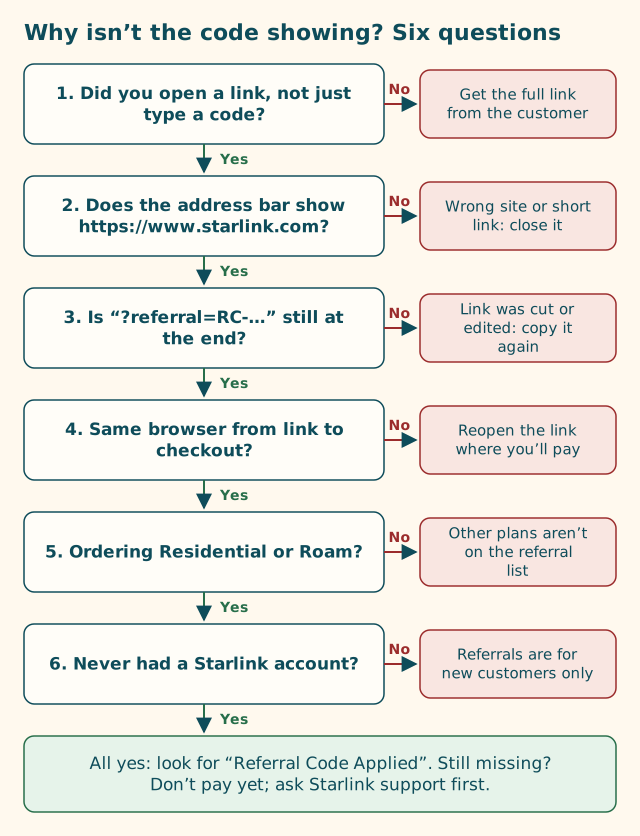
What each answer means, and the fix
1. Did you open a link, not just type a code?
Why it matters: Starlink’s steps for new customers begin “Open the unique referral link you were sent.” The code reaches checkout inside that web address. We found no box at US checkout to type a code into, so a code on its own can’t attach.
If no: Ask the person who shared the code for their full link, copied from the Referrals section of their Starlink account. Here’s what to do with a bare code sent by text.
2. Does the address bar show https://www.starlink.com?
Why it matters: A referral only works on starlink.com. If a short link, a coupon page or a look-alike site sent you somewhere else, there’s no Starlink order to attach a referral to, and you shouldn’t be typing details there anyway.
How to check: Tap or click the address bar so you see the whole address. Read up to the first single slash after https://; it must end in starlink.com. www. in front is fine. Anything after .com before that slash (like starlink.com.deals.example) means a different site.
If no: Close the tab without typing anything. If you started from a short link, see shortened referral links. If you’re unsure about a site, read look-alike domains.
3. Is “?referral=RC-…” still at the end?
Why it matters: The code is the value after referral=. Some apps, link shorteners, email security tools and copy-paste slips drop or damage everything after the ?. If it’s gone, there’s nothing for starlink.com to read.
How to check: Look at the end of the address. You should see ?referral=RC- followed by the code. Extra tags like &utm_source=… after it are fine. A stray period, quote mark or bracket at the very end is not.
If no: Go back to the original message and copy the link again, whole. On a phone, press and hold the link and use the copy option rather than selecting text by hand (how to copy a link on a phone). On a work computer, the link may have been rewritten by security software (work laptops that rewrite links). See anatomy of a referral link for what each part should look like.
4. Same browser from link to checkout?
Why it matters: The browser that opened the link is the one carrying the code. Starlink doesn’t document whether starlink.com remembers a referral if you leave and come back, switch browsers, or move from phone to computer. Common slips:
- tapping the link inside a messaging or social app (which opens its own built-in browser), then finishing in Safari or Chrome,
- opening the link on your phone, then ordering on a laptop,
- opening it, closing the tab, and later typing starlink.com directly,
- moving from the browser to the Starlink app partway through. (Starlink doesn’t say whether the referral carries into the app.)
If no: Open the original link again, in the browser you’ll pay in, and go straight through to the order page in that same tab.
5. Ordering a Residential or Roam plan?
Why it matters: Starlink’s help article says referral credits will only issue on Residential plans (Residential Lite, Residential, Residential 100 Mbps, Residential 200 Mbps, Residential Max) and Roam plans (Roam 100GB, Roam 300GB, Roam Unlimited). Business, maritime and aviation plans aren’t on that list.
Starlink doesn’t publish whether the order page hides the referral line for a plan that isn’t on the list, so this may or may not be why it’s missing. But if you’re ordering a plan that isn’t listed, the referral won’t give you anything either way.
If no: If one of the listed plans suits you, switch to it and check again. Our plan-by-plan table and business, boat and aviation plans cover this.
6. Never had a Starlink account?
Why it matters: Starlink says existing or returning customers aren’t eligible, and its terms require that the new customer is not, and has never been, a Starlink subscriber.
Also check which account you’re signed into: on a shared computer you may be signed into someone else’s existing account.
If no: If you had Starlink before, even briefly, the referral isn’t for you. If you’re signed into someone else’s account by mistake, sign out, open the link again (a private window helps), and sign in or create an account with your own email. See helping someone order.
All six are yes, and it’s still missing
That’s unusual, and it’s where you should ask before paying:
- Take a screenshot of the order page and the full address bar (crop out card details).
- Try once more in a private window: open the original link, go to the order page, and look again.
- Contact Starlink support through your account or the contact options linked from starlink.com, and describe what you see. Don’t use phone numbers from ads.
- Ask the referrer whether their link still works for them. A referrer must have an active Starlink plan to take part, per Starlink’s referral page, though how a lapsed referrer’s link behaves isn’t published.
- Tell us if you think something has changed at checkout. If a pattern emerges, we’ll update this guide with the date.
What a working order looks like
When the referral is attached, a third-party walkthrough describes two signs: a banner at the top of starlink.com saying you’re using a referral link, and “Referral Code Applied” on the order page before you submit. The exact wording can change; Starlink’s help center doesn’t show it. Once you see it, you can pay. For a new customer, a working referral means one free month of service on the eligible plan you choose, credited to the second bill.
What happens after you’ve paid (the credit arriving on bill two) is a different question from this page, which is about getting the code onto the order in the first place.
Quick reference
| Question | How often it’s the cause (our view) | Time to fix |
|---|---|---|
| 1. Link, not a typed code? | Very common | A message to the sender |
| 2. Really starlink.com? | Less common, but the most important | Seconds to check; close if wrong |
| 3. Referral part intact? | Common, especially from phones and work email | A minute to recopy |
| 4. Same browser throughout? | Common | A minute to reopen the link |
| 5. Residential or Roam? | Occasional | A plan decision |
| 6. New to Starlink? | Occasional | Can’t be fixed; the referral isn’t for returning customers |
The “how often” column is our editorial judgement from how links break, not measured data. We don’t have counts, and we won’t invent them.
Prevent it next time
If you’re about to share or use a referral link, these habits stop most problems before they start:
- Get the full link, copied from the Referrals section of the customer’s account. Not a code, not a screenshot, not a short link.
- Open it on the device you’ll pay with, in your normal browser, not inside a messaging app.
- Go straight through from the link to the order page in one tab, in one sitting.
- Sign in with your own email, and check you’re not signed into someone else’s account on a shared computer.
- Pick your plan from the referral list before you start.
- Look for the confirmation before you type card details, every time.
What we don’t know
- Whether the order page shows the referral line for plans outside the referral list. Not published.
- Whether starlink.com remembers a referral across visits, browsers or devices. Not published.
- Whether a link opened in a browser carries into the Starlink app. Not published.
What to do next
Paste your link into our link and code checker for a quick read of questions 2 and 3, then follow the where-to-enter walkthrough from the top.
Questions people ask
Why doesn't my Starlink order page show Referral Code Applied?
The most common causes are typing a code instead of opening the link, a link that isn't starlink.com, a link that lost its ?referral= part, or opening the link in a different browser from the one you're paying in. Work through the six questions in order.
Should I pay if the referral code isn't showing?
We wouldn't. A third-party guide to the program says a referral can't be added after the order is placed, and Starlink publishes no way to do it. Fix the cause first, or ask Starlink support.
The link has ?referral=RC- in it but the code still isn't showing. Why?
Check that you're in the same browser that opened the link, that you're ordering a Residential or Roam plan, and that you've never had a Starlink account. If all are true, ask Starlink support before paying.
Can a returning Starlink customer use a referral code?
No. Starlink says existing and returning customers aren't eligible, and its terms require that you are not, and have never been, a Starlink subscriber.
Does the referral work in the Starlink app?
Starlink's steps describe opening the link and signing up on starlink.com. Whether a link opened in a browser carries into the app isn't published, so we suggest finishing the order in the browser that opened the link.
What does Referral Code Applied look like?
A third-party walkthrough of the program reports a banner at the top of starlink.com saying you're using a referral link, and the words Referral Code Applied on the order page before you submit. Starlink's help center doesn't show the exact wording.
Related guides
Seven mistakes people make with a Starlink referral code
Most failed referrals come down to the same handful of habits. Here's each one, why it breaks the referral, and what to do instead.
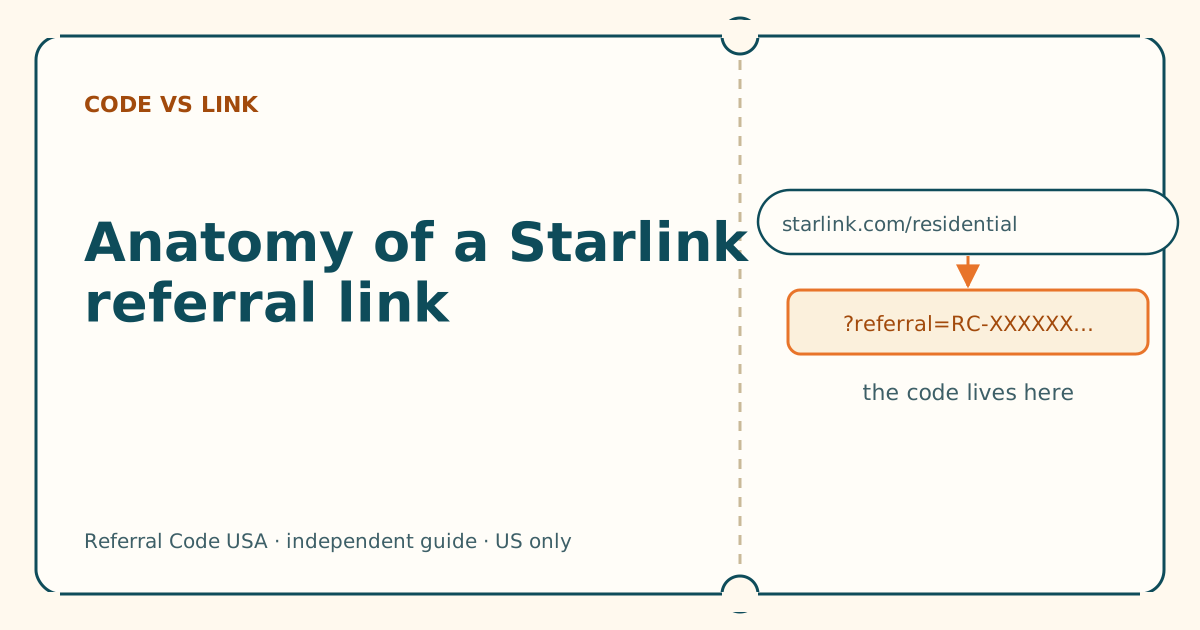
Anatomy of a Starlink referral link, piece by piece
Five parts, one job. Once you can read the address, you can tell a working referral link from a broken or fake one in seconds.
Copy a referral link on your phone without breaking it
Dragging selection handles across a long link is where codes get cut off. Press and hold the link itself instead, then check the end of what you pasted.
Sources
What we read for this article, and when. Prices on this site come from one data file, re-read at least every 30 days.
- How do I use a referral link? (Starlink help center), retrieved
- Referral Program Terms, US (DOC-1882-84808-83), retrieved
- How to Use Starlink's Referral Program (DISHYtech, third-party guide), retrieved
- How do I refer people to Starlink? (Starlink help center), retrieved
- URL: search property (MDN Web Docs), retrieved
Spotted something out of date? Report it, and see how we check claims.
Independent · not affiliated with SpaceX. Referral Code USA is an independent site. Some pages may show our own Starlink referral code; if you order with it, we may receive a referral reward from SpaceX. That never changes what an article says, and articles about scams carry no code at all. How we make money.