Look-alike domains: spotting starlink.com imitations
A fake site can copy Starlink's look perfectly. It can't copy the address. Learn to read the address, and the disguise stops working.
Key takeaways
- Read the address up to the first single slash after https://. It must end in exactly starlink.com.
- Common tricks: extra words (starlink-promo), extra endings (starlink.com.order), swapped letters (starIink) and doubled letters.
- A referral code only works on starlink.com. On any other site, the code is just bait.
- Starlink says genuine emails come from @starlink.com with no variations, and account details belong only on starlink.com or its apps.
- If you typed details into a fake site: card company first, then passwords, then report it.
On this page
To spot a starlink.com imitation, read the web address up to the first single slash after https://. That stretch must end in exactly starlink.com (with or without www. in front). Look-alike domains break this rule in a few predictable ways: extra words (starlink-promo.example), extra endings after .com (starlink.com.order.example), swapped characters (starIink with a capital I) and doubled letters (starlinkk). A referral code only works on starlink.com, so on any other site, a “code” is just bait. If you’ve already typed details into a fake site, call your card company first.
How look-alike domains are made
A fake site can copy Starlink’s pages, fonts and photos in minutes. What it can’t do is use the starlink.com address, because only the owner of a domain controls it. So scammers pick addresses that look close enough at a glance, especially on a phone where the address bar is tiny or hidden.
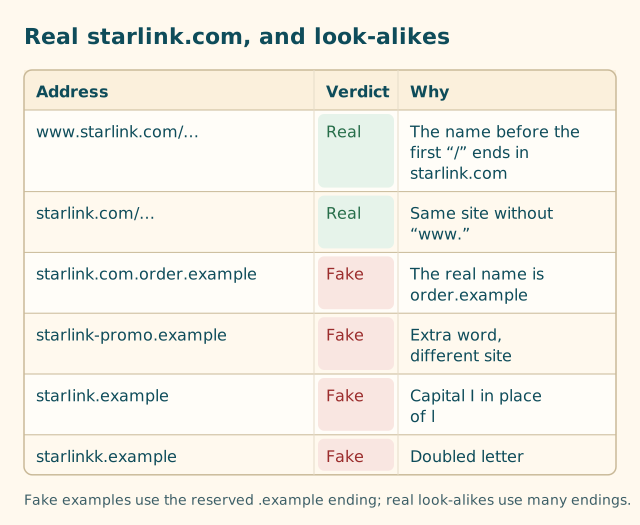
The main patterns:
| Trick | Example | What’s really going on |
|---|---|---|
| Extra word | starlink-promo.example, getstarlink.example, starlink-deals.example |
A different domain that contains the word |
| Extra ending | starlink.com.order.example |
The real domain is order.example; “starlink.com” is just a prefix they chose |
| Swapped character | starIink.example (capital I), 5tarlink.example |
Letters or digits that look alike in many fonts |
| Doubled or missing letter | starlinkk.example, starlnk.example |
Relies on you reading the word, not the letters |
| Different ending | starlink.example, starlink-com.example |
Same word, different domain |
| Login-style prefix | starlink.com@other.example |
Everything before @ is treated as a username, not the site; the site is other.example |
We use the reserved .example ending in every fake example on this site. It’s set aside for documentation, so it can never belong to a real scam site. Real look-alikes use .com, .net, .shop, .online and many more.
How to read a domain in five seconds
- Find
https://at the start. - Find the next single
/. (Ignore the two slashes inhttps://.) If there’s an@before that slash, the real site is whatever comes after the@. - Read backwards from that slash. The last two pieces, separated by a dot, are the domain. For Starlink, they must be
starlinkandcom, in that order, with nothing in between. - Check the letters. Is it
starlinkwith a lowercase L, or a capital I or a digit 1? On a phone, zoom in or paste it into a note in a different font.
| Address | Step 3 reads | Starlink? |
|---|---|---|
https://www.starlink.com/residential?referral=RC-… |
starlink.com | Yes |
https://starlink.com/roam |
starlink.com | Yes |
https://starlink.com.order.example/residential |
order.example | No |
https://www.starlink-promo.example/ |
starlink-promo.example | No |
On a phone, tap the address bar to see the full address. Some mobile browsers show only part of it until you do. Our anatomy of a referral link breaks down the rest of the address after the domain.
Use the checker if unsure
Paste any link into our link and code checker. It runs in your browser (nothing you paste is sent anywhere) and flags addresses that borrow the Starlink name without being starlink.com, as well as other sites and shortened links.
Practice: five addresses
Try these before reading the answers. Apply the rule: find the first single slash after https://, then read the two pieces just before it.
https://www.starlink.com/roam?referral=RC-XXXXXX-XXXXX-XXhttps://starlink.com.checkout-secure.example/residentialhttps://www.starlinkoffers.example/promohttps://starlink.com/residentialhttps://www.starIink.example/residential?referral=RC-XXXXXX-XXXXX-XX
Answers.
- Real. The two pieces before the first slash are
starlinkandcom. It’s a referral link that opens the Roam page. - Fake. The two pieces before the first slash are
checkout-secureandexample. “starlink.com” at the front is decoration. - Fake.
starlinkoffers.exampleis one name, and it isn’t starlink.com. - Real. starlink.com, no
www., Residential page. No referral in it, so no code would apply, but it’s Starlink’s site. - Fake. It looks right at a glance, but
starIinkuses a capital I. It even carries a code-shaped referral part, which is exactly why reading the domain comes before reading the code.
If you got all five, you can spot nearly every look-alike you’ll meet.
On a phone: where the address hides
Phones make this harder, because the address bar is small and some browsers shorten what they show.
- Tap the address bar to see the full address. Some mobile browsers show only the site name until you do, and some hide the bar as you scroll; scroll up slightly to bring it back.
- In-app browsers (inside social or messaging apps) may show only a page title. Use the app’s menu to “Open in browser”, then read the address there.
- Long-press a link before opening it to preview its address. Read it with the same rule.
- QR codes: your camera usually shows the address before opening it. Read it first.
If you can’t see the address at all, don’t type anything into the page.
Where look-alike links come from
- Ads and search results for “Starlink promo code” or “Starlink deals”. Look at the address, not the headline.
- Text messages and emails about your account, a payment problem, or a “free upgrade”. Starlink’s help center says
Authentic emails will come from the “@starlink.com” email domain without any variations.
The same address-reading rule applies to email senders:support@starlink-help.exampleisn’t Starlink. - Social media and comment sections, often as shortened links you can’t read. See shortened referral links.
- QR codes on flyers or stickers. A QR code is just a link; check the address your camera shows before opening.
- Coupon and “deal” pages that send you onwards to an order page.
Starlink’s help center also says all information for your Starlink account should only be entered at the official starlink.com website or official iOS and Android applications.
If a page asks for your card, password or Social Security number and the address isn’t starlink.com, close it.
What to do if you landed on one
If you only looked
Close the tab. Don’t sign in, don’t enter an address, don’t download anything. You haven’t lost anything. If a pop-up insists you must “update” or “verify” something, it’s part of the scam; close the browser if you have to.
If you entered details
Work through this in order. Speed matters most for payment details.
- Card or bank details: call your bank or card company now. Starlink’s help center says to contact your financial institution if you entered payment information, because it may have been compromised.
- Your Starlink password: Starlink’s help center says to update it, and not to reuse the same email and password combination for any other services. If you used that password elsewhere, change it there too.
- Social Security number or bank account number: the FTC directs people to IdentityTheft.gov.
- Anything installed: remove it, then update your security software and run a scan, as the FTC advises for possible malware.
Report it
- ReportFraud.ftc.gov for fraud and scam sites.
- Forward phishing emails to reportphishing@apwg.org and scam texts to SPAM (7726), as the FTC suggests.
- Tell Starlink through the support options linked from starlink.com, so they know their name is being used.
Habits that make fakes harmless
- Type starlink.com yourself when you just want to browse or check prices, instead of clicking ads.
- Open referral links only from people you know, and check the address before you type anything.
- Look at the address bar at the payment step. It’s the last moment to catch a swap.
- Don’t trust the padlock alone. A padlock means the connection is encrypted, not that the site is who it claims to be. Fake sites can have padlocks too.
Why this matters for referral codes
Starlink’s US referral terms say the order must be placed using the referrer’s link on starlink.com and that the kit must be bought directly from www.starlink.com.
So a “referral code” on any other site isn’t a referral at all. It’s a lure. The real thing is always a starlink.com address with ?referral=RC-… on the end, and it never asks you to pay anyone but Starlink.
What to do next
Bookmark starlink.com, check any link with our link and code checker, and read how to spot a fake promo code for the other red flags.
Questions people ask
What is Starlink's real website?
starlink.com. With or without www. in front, the address must end in starlink.com before the first single slash. Anything added after .com, like starlink.com.order.example, is a different website.
How do I know if a Starlink website is fake?
Read the web address, not the page. If the part before the first single slash doesn't end in exactly starlink.com, it's not Starlink, however real it looks.
Is starlink-deals or starlink-promo a real Starlink site?
Any name with extra words around starlink, such as starlink-deals or starlink-promo, is a different website from starlink.com. A Starlink referral code can't apply there.
Do Starlink emails come from other domains?
Starlink's help center says authentic emails come from the @starlink.com domain without any variations, and that a sender address from anything else is a scam.
I entered my card on a fake Starlink site. What should I do?
Call your bank or card company immediately. If you entered a Starlink password, change it and don't reuse that email and password combination elsewhere. Then report the site at ReportFraud.ftc.gov.
Why do your examples end in .example?
The .example ending is reserved for documentation, so it can never belong to a real scam site. Real look-alikes use .com, .net, .shop and many other endings.
Related guides
How to spot a fake Starlink promo code
Fake codes are easy to spot once you know the one fact behind them: Starlink's US checkout has no box for a code. Everything else follows from that.
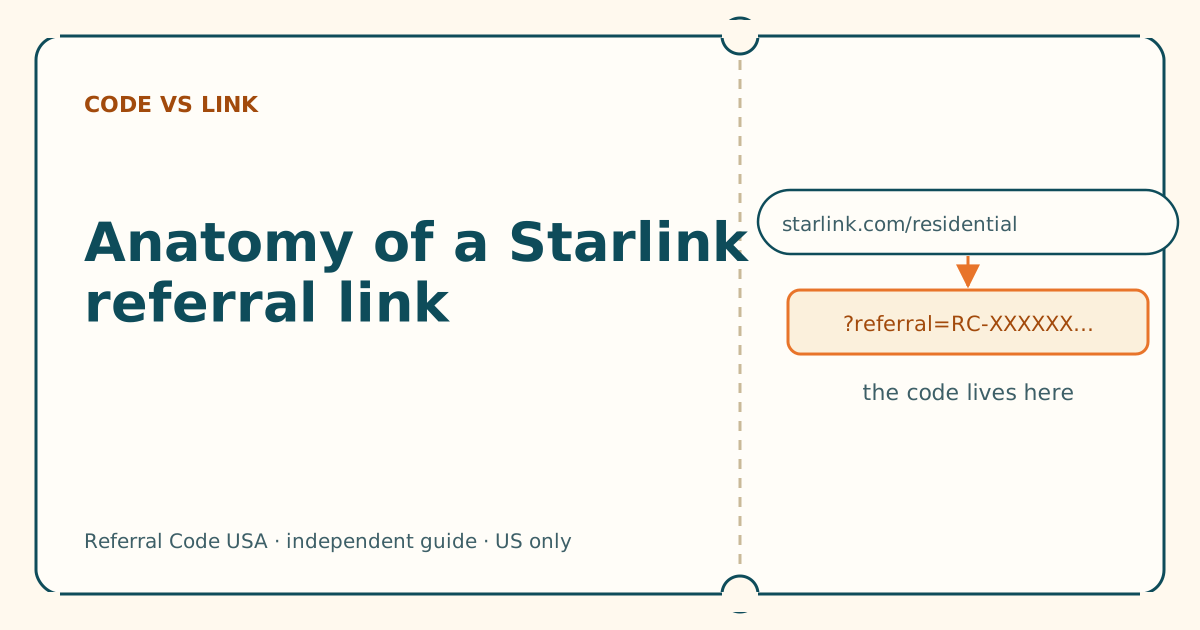
Anatomy of a Starlink referral link, piece by piece
Five parts, one job. Once you can read the address, you can tell a working referral link from a broken or fake one in seconds.
Never pay for a Starlink referral code
Every current Starlink customer has a referral link they can share for free. Anyone charging for one is selling something that costs nothing, or nothing at all.
Sources
What we read for this article, and when. Prices on this site come from one data file, re-read at least every 30 days.
- Phishing or suspicious emails or texts claiming to be from Starlink (Starlink help center), retrieved
- How to recognize and avoid phishing scams (FTC Consumer Advice), retrieved
- RFC 2606: Reserved Top Level DNS Names (IETF), retrieved
- Referral Program Terms, US (DOC-1882-84808-83), retrieved
- URL: search property (MDN Web Docs), retrieved
Spotted something out of date? Report it, and see how we check claims.
Independent · not affiliated with SpaceX. Referral Code USA is an independent site. Some pages may show our own Starlink referral code; if you order with it, we may receive a referral reward from SpaceX. That never changes what an article says, and articles about scams carry no code at all. How we make money.