Helping someone order: whose device opens the link?
The new customer's own browser, account and card should carry the order. The helper's job is the link, the reading and the final check.
Key takeaways
- Open the referral link on the buyer's device, in the browser they'll pay in.
- The buyer signs in or creates an account with their own email. Never use the helper's Starlink account.
- If the helper is also the referrer, Starlink's terms say they may share only the link, and the buyer gives their own details to Starlink.
- Sit side by side. The helper reads screens and points out “Referral Code Applied” before payment.
- If you must use the helper's computer, sign out of starlink.com first, or use a private window.
On this page
When you help someone order Starlink with a referral link, the link should be opened on the buyer’s own device, in the browser they’ll pay in, and the order should be placed in their own account with their email and card. The helper sends the full link, sits alongside, reads the screens and checks for “Referral Code Applied” before payment. If the buyer has to use the helper’s computer, sign out of starlink.com first (or use a private window) so the order can’t land in the wrong account.
Why the buyer’s own session matters
Three things have to line up for a referral to land on an order, and each one belongs to the buyer.
The code lives in the browser that opened the link. The referral code sits at the end of the web address (?referral=RC-…). Starlink’s steps for new customers start with “Open the unique referral link you were sent.” Whichever browser opens that address is the one that carries the code to checkout. Starlink doesn’t say whether starlink.com remembers a referral across devices, so if the helper opens the link on their phone and the buyer orders on a tablet, assume the tablet has no code.
The order must be a new customer’s order. Starlink’s US terms require that the referred subscriber is not, and has never been, a Starlink subscriber
, and that referred subscribers are individuals (“natural persons”). If the helper already has Starlink and is signed in on the computer being used, the order can end up attached to an existing customer, which defeats the referral and creates a mess of two services on one account.
Details and payment belong to the buyer. The service address, contact details and card on the order should be the buyer’s. That isn’t just tidiness: if the helper is also the person whose link is being used, the terms limit what they may do (more on that below).
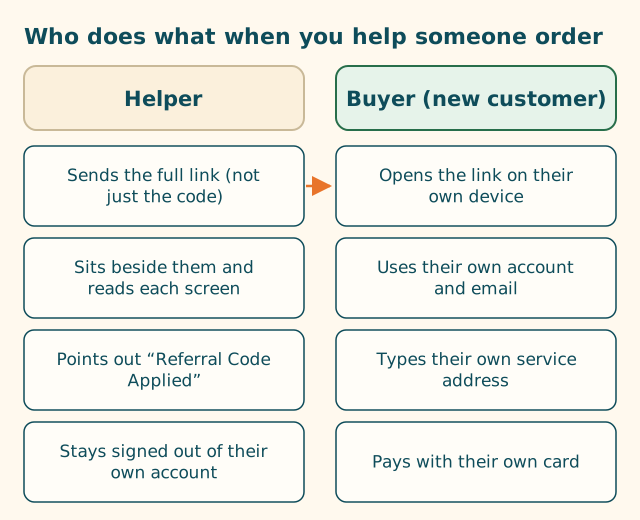
Who does what
If the helper is the referrer
This is common: you have Starlink, your parent or friend wants it, and you’re helping them use your link. Starlink’s terms are specific about what a referrer may do. Section 6.4(h) says the referrer must not collect or process the prospective customer’s personal data on SpaceX’s behalf, and that The Referrer may share only the Unique Referral Link and must direct the prospective customer to provide information through SpaceX’s authorized channels.
Section 6.4(g) also bars the referrer from conducting any transaction on SpaceX’s behalf, including receiving payment from the customer.
In plain terms: share your link, explain the screens, but let them type their own address and email, and let them pay Starlink directly. Don’t take their card and order for them, and don’t take money from them to “cover” the order. (Program rules for referrers are a bigger topic; this is the part that touches helping at the keyboard.)
Doing it side by side: step by step
- Send the link to the buyer’s device. Text or email it to them, copied from your account’s Referrals page if it’s your link, or forwarded unchanged from whoever sent it. Not a screenshot, and not just the code.
- The buyer opens it. On their phone, tablet or computer, in the browser they’ll use to pay. If it opens inside a messaging app’s built-in browser, copy it into their normal browser instead.
- Check the address bar together. It should read starlink.com and end with
?referral=RC-…. If anything looks off, run it through our link and code checker. - The buyer enters their own service address. That’s where the dish will be used, which sets the plans and prices they see. See what a service address is.
- The buyer picks a plan. The referral credit is listed for Residential and Roam plans; our plan table shows the full list.
- The buyer signs in or creates an account with their own email.
- Before payment, the helper checks the order page for “Referral Code Applied”. A third-party walkthrough reports this line, along with a banner at the top of the site saying a referral link is in use. If it’s missing, stop and go through the six-question flowchart.
- The buyer enters their own card and submits. Take a screenshot of the order summary for their records.
If it works, the buyer gets one free month of service on the eligible plan you choose, credited to their second bill.
Helping from a distance
Over a video call, the same split works. Send the link by text or email, have the buyer open it on their device, and ask them to share their screen if they’re comfortable. Talk them through each screen. Never ask them to read out a card number, a password or a one-time code, and never ask them to send those by message. Starlink’s own help center says it will never ask for personal information by text, email or phone, and the same caution makes sense between family members.
If you have to use the helper’s device
Sometimes the buyer doesn’t have a computer, or their phone is too old. If the order has to happen on the helper’s device:
- Sign out of starlink.com in that browser, or better, open a private (incognito) window, which starts without your saved sign-in.
- Check the Starlink app isn’t signed in to the helper’s account if you’ll use the app at any point. (Whether a referral opened in a browser carries over into the app isn’t something Starlink publishes, so we suggest finishing in the browser.)
- Open the referral link in that private window and continue as above, with the buyer creating or signing into their own account.
- Turn off password autofill prompts or ignore them: you don’t want the helper’s saved Starlink login filling in.
- Close the private window when done, so the buyer’s session isn’t left on your computer.
Three situations, worked through
Helping a parent who lives far away
You have Starlink; your parent doesn’t, and you’ll help by phone or video. Copy your link from the Referrals section of your account and text it to them. On the call, ask them to tap it and tell you what the address bar says, or share their screen. Talk them through the address, plan and account screens while they type. When they reach the order page, ask them to read out whether they see “Referral Code Applied”. Don’t ask for their card number or password, and don’t log in as them. If they get stuck, it’s better to stop and pick it up another day than to take over.
Ordering for a household you share
You and a spouse or housemate share a home, and one of you already has Starlink at a previous address, or has never had it. The referral is for the person placing the order as a new customer. If the person who’s never had Starlink is ordering, they use their own account and email and their own card. If the only person ordering has had Starlink before, the referral doesn’t apply: Starlink says returning customers aren’t eligible.
Helping a neighbor who isn’t online yet
Your neighbor has no internet at home, which is why they want Starlink. They’ll need a device with a connection to order: their phone’s mobile data, a library computer, or your device in a private window. If it’s your device, follow the steps in the section above: private window, their own account, their own card, and close the window when done. They’ll also need an email address for their Starlink account; if they don’t have one, setting one up first is part of helping.
What not to do
- Don’t open the link on your phone “to check it” and then hand over a laptop. The laptop doesn’t have the code.
- Don’t order in your own account and plan to “transfer” it. Starlink’s terms list private transfers from a third party as ineligible for referrals.
- Don’t fill in the buyer’s personal details for them if you’re the referrer. Let them type.
- Don’t buy the kit at a store for them and expect the referral to apply at activation. The terms require ordering directly on starlink.com.
- Don’t let anyone pay you for the code or for “applying” it. Referrals cost the buyer nothing extra. See never pay for a referral code.
What we don’t know
- Whether starlink.com keeps a referral across devices or long gaps between visits. Not published, so keep it to one device, one sitting.
- Whether a referral link opened in a browser carries into the Starlink app. Not published.
- What the referrer’s email notification shows about the buyer. Starlink says the referrer is emailed when someone buys through their link, but doesn’t publish what it contains.
What to do next
Send the buyer the full link, open our where-to-enter walkthrough on your own screen to follow along, and work through the seven common mistakes together before you start.
Questions people ask
Can I use my computer to order Starlink for my parent with a referral link?
You can, but sign out of your own Starlink account first or use a private window, and have your parent sign in or create their own account. The referral is for a new customer, so the order must sit in their account, not yours.
Can I order Starlink for someone else using my own account?
Not with a referral. Starlink's terms say the referred customer must never have been a Starlink subscriber. An order from an existing customer's account isn't a new customer ordering.
I referred my friend. Can I fill in the order for them?
Starlink's terms say a referrer may share only the referral link and must direct the person to give their information through Starlink's own channels. Let your friend type their own details and pay.
Does it matter whose phone opens the referral link?
Yes. The code travels in the web address that phone opened. If the link is opened on the helper's phone but the order is placed on the buyer's laptop, the laptop never saw the code.
Can I help someone order over a video call?
Yes. Send them the full link, have them open it on their device, share their screen if they like, and talk them through each screen. Don't ask them to read card details or passwords aloud.
Related guides
Seven mistakes people make with a Starlink referral code
Most failed referrals come down to the same handful of habits. Here's each one, why it breaks the referral, and what to do instead.
Copy a referral link on your phone without breaking it
Dragging selection handles across a long link is where codes get cut off. Press and hold the link itself instead, then check the end of what you pasted.
What a service address is on a Starlink order
Three addresses can appear on one order. Only one decides your plans, prices and whether a US referral fits: the service address.
Sources
What we read for this article, and when. Prices on this site come from one data file, re-read at least every 30 days.
- Referral Program Terms, US (DOC-1882-84808-83), retrieved
- How do I use a referral link? (Starlink help center), retrieved
- How do I refer people to Starlink? (Starlink help center), retrieved
- Phishing or suspicious emails or texts claiming to be from Starlink (Starlink help center), retrieved
- How to Use Starlink's Referral Program (DISHYtech, third-party guide), retrieved
Spotted something out of date? Report it, and see how we check claims.
Independent · not affiliated with SpaceX. Referral Code USA is an independent site. Some pages may show our own Starlink referral code; if you order with it, we may receive a referral reward from SpaceX. That never changes what an article says, and articles about scams carry no code at all. How we make money.