Work laptops that rewrite referral links
Company email often wraps every link in a security address. Usually the referral survives the trip. Sometimes it doesn't, and you can't tell by looking at the email.
Key takeaways
- Work email security tools such as Microsoft Safe Links and Proofpoint URL Defense rewrite links so clicks go through a checker first.
- The rewritten link carries the original inside it, encoded. After the check, you're normally sent on to the original address.
- Always read the final address bar: starlink.com, then ?referral=RC- and the code.
- Copying a wrapped link from a work email can give you the wrapper, not the referral link.
- Better: open the link on a personal device, in the browser you'll pay in.
On this page
- What security tools do to links
- What that looks like for a referral link
- Where it can go wrong
- How to see the real link
- Better device choice
- Step by step: from work email to a clean order
- Other places links get checked or changed
- Decoding a wrapped link by eye (without editing it)
- What we don’t know
- What to do next
- Questions people ask
- Sources
Many company email systems rewrite every link in incoming mail so that clicks pass through a security checker first. Microsoft’s Safe Links rewrites links to an address beginning https://nam01.safelinks.protection.outlook.com (the region part varies), and Proofpoint’s URL Defense rewrites them to https://urldefense.com/…. The original Starlink referral link is carried inside, encoded, and after the check you’re normally sent on to it, so the referral usually survives. But you can’t confirm that from the email. Read the final address bar on starlink.com for ?referral=RC- and the code, and if you can, open the link on a personal device instead.
What security tools do to links
Two of the most common tools in US workplaces describe their behavior publicly.
Microsoft Safe Links (part of Microsoft Defender for Office 365). Microsoft’s documentation says scanned URLs are rewritten or wrapped using the Microsoft standard URL prefix: https://<DataCenterLocation>.safelinks.protection.outlook.com
, and that clicking a rewritten link scans it before directing you to the page. It also notes that you normally see the original link text in the email, and that hovering shows a pop-up with the original URL. Rewriting happens per recipient, including when a message is forwarded.
In Microsoft Teams and supported Office apps, Microsoft says links are checked when you click them but not rewritten, so a link shared in Teams usually looks normal.
Proofpoint URL Defense. University IT departments that use it describe the same idea: it rewrites scanned URLs to Proofpoint’s standard URL format https://urldefense.com/.
In HTML email you see the normal link text, and hovering reveals the rewritten address; in plain-text email, you see the rewritten address directly.
Other email security products work in similar ways. Your company may use one, several or none.
What that looks like for a referral link
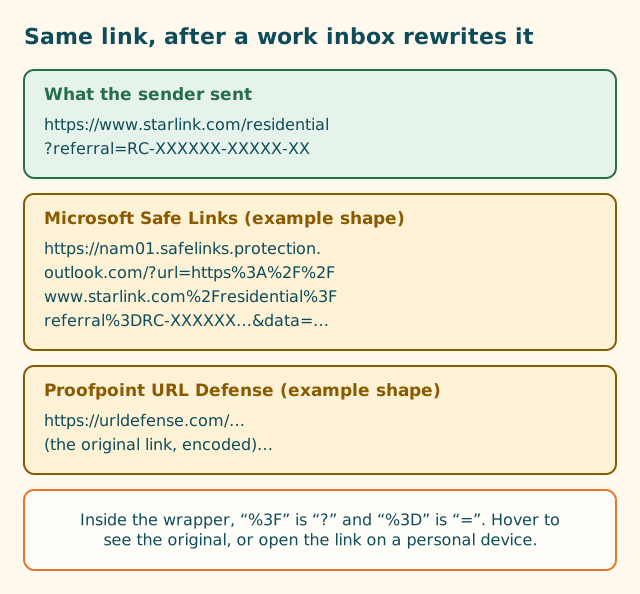
Inside a wrapped link, the original address is percent-encoded: characters that have special meaning in a web address are replaced with codes. The two that matter for a referral are:
| You see | It means |
|---|---|
%3A%2F%2F |
:// |
%2F |
/ |
%3F |
? (the start of the query string) |
%3D |
= |
So www.starlink.com%2Fresidential%3Freferral%3DRC-… inside a Safe Links address is just www.starlink.com/residential?referral=RC-… in disguise. If you see referral%3DRC- in there, the code is present in the wrapped link.
Where it can go wrong
Rewriting usually works. The failure points are around it:
- Copying the wrapper instead of the link. If you right-click and copy a link from a work email, you may copy the security address, not the referral link. Paste that into another browser or send it to someone else, and it may fail, expire, or reveal that it came through your employer’s mail system.
- A blocked or held link. If the security service can’t finish scanning, or classes starlink.com links as suspicious for some reason, you might see a warning or an error page rather than starlink.com. Microsoft documents several warning pages, including “scan in progress” and an error page when a URL can’t be opened.
- Double wrapping. Forwarded messages, or mail that passes through two security systems, can wrap a link twice. Microsoft notes that another service wrapping links first can prevent Safe Links from processing them.
- Web filters on the work network. Separate from email, some employers filter browsing. A filter could block starlink.com, or strip parts of addresses.
- Switching devices. Opening the link on your work laptop, then ordering at home on your own computer, means the home computer never saw the code.
How to see the real link
Hover first
On a work computer with Outlook, hover over the link. Microsoft says Safe Links shows a pop-up with the original URL. Read it against our anatomy of a referral link: starlink.com, then ?referral=RC- and the code.
Click, then read the address bar
If you click, let the security check finish, and then look at the address bar of the page that loads. You should be on starlink.com, with the full referral link in the bar. If it’s all there, that’s your clean link. You can copy it from the address bar (not from the email) if you need it again.
Use the checker
Paste the original link (from the hover pop-up, or from the address bar after it loads) into our link and code checker. It runs in your browser and doesn’t send what you paste anywhere. It flags links that aren’t starlink.com and ones without a code.
Better device choice
For a personal purchase like Starlink, a personal device is simply the better place to open a referral link:
- No rewriting. Personal email accounts may scan links too, but the wrapping described above is a business feature.
- No work filters or monitoring. Your employer’s software may log browsing on a managed laptop. Your Starlink order includes your home address and payment details.
- One device, one sitting. You’ll probably order at home anyway. Opening the link there means the browser that sees the code is the one you’ll pay in.
If the link was sent to your work email, ask the sender to resend it to a personal address or by text. Or, if you’ve already opened it on your work computer and the address bar showed the full link, send that clean link to yourself.
Step by step: from work email to a clean order
- In your work email, hover over the link and check it points to starlink.com with
?referral=RC-…. - Ask the sender to resend it to your personal email or phone, or send yourself the clean link from the address bar.
- On your personal device, open the link in the browser you’ll pay in.
- Check the address bar: starlink.com, then the referral part, nothing strange at the end.
- Go through the order screens in that same tab. Before paying, look for “Referral Code Applied”, which a third-party walkthrough reports on the order page when the referral is attached.
For a new customer, a working referral gives one free month of service on the eligible plan you choose, credited to the second bill.
Other places links get checked or changed
Email isn’t the only place a work setup can touch a link:
- Microsoft Teams and Office documents. Microsoft says Safe Links checks links in Teams and supported Office apps when you click them, without rewriting them. A link in a Teams chat or a Word document usually looks normal, but the click goes through a check first.
- Company web filters and proxies. Separate from email, some employers route web traffic through filtering services. These can block sites or show warning pages. If starlink.com is blocked at work, use a personal device on a personal connection.
- Managed browsers. On a company-managed laptop, the browser may have extensions or policies installed by IT. They usually leave addresses alone, but you can’t easily see what they do.
- Forwarding to yourself. Forwarding a work email to your personal address can carry the wrapped version of the link with it. Microsoft notes that rewriting applies even to manually forwarded messages. Copy the clean address from a loaded starlink.com page instead, or ask the sender to resend.
Decoding a wrapped link by eye (without editing it)
You don’t need to edit anything to check whether a wrapped link still carries a code. Look inside it for these strings:
starlink.com(it may appear aswww.starlink.comafter%2F%2F).referral%3DRC-orreferral=RC-.- The code characters after that, up to the next
&or%26.
If all three are there, the wrapped link contains the referral. Opening it and reading the final address bar is still the real test, and the order page’s “Referral Code Applied” line is the final one.
What we don’t know
- Whether every version of every email security product preserves the full referral link through its redirect. Products and settings vary; your IT team configures them.
- Whether starlink.com treats a referral that arrived through a security redirect differently. Starlink doesn’t say. If the final address and the order page both show the referral, we know of no reason it would matter.
What to do next
If the code still isn’t showing, work through our six-question flowchart, then follow the where-to-enter walkthrough.
Questions people ask
Why does my Starlink referral link look strange in my work email?
Many company email systems rewrite links for security. Microsoft's Safe Links, for example, rewrites scanned links to an address starting https://nam01.safelinks.protection.outlook.com, with the original link encoded inside it.
Will a Safe Links or URL Defense link still apply the referral?
Normally the security service checks the link and sends you on to the original address, so the referral should arrive. But check the final address bar on starlink.com for ?referral=RC- and the code before ordering.
How do I get the original link out of a rewritten one?
Hover over the link in your email: Microsoft says a pop-up shows the original URL for Safe Links. Or click it, let it pass the check, and copy the address from the starlink.com page that loads.
Should I order Starlink on my work computer?
It works if the link arrives intact, but your employer's software may log browsing, and the order is personal. Opening the link on a personal phone or computer avoids both the rewriting and the privacy question.
My company blocks starlink.com. What now?
Use a personal device on a personal connection. Don't try to get around your employer's filtering.
Related guides
Shortened referral links: see where they go first
A shortened link could be a working referral, a plain starlink.com page or a different website entirely. You can't tell by looking. Here's how to find out without risk.
Anatomy of a Starlink referral link, piece by piece
Five parts, one job. Once you can read the address, you can tell a working referral link from a broken or fake one in seconds.
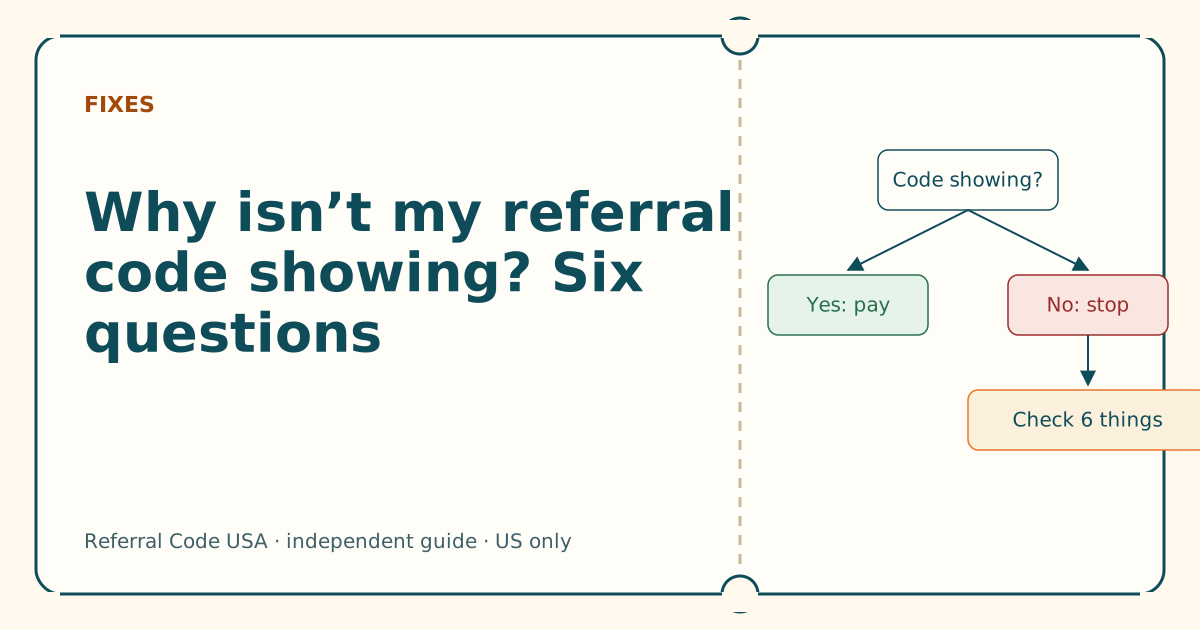
Why isn't my referral code showing? Six questions
Answer six yes-or-no questions in order. The first “no” is almost always your cause, and each one has a fix you can do in a minute.
Sources
What we read for this article, and when. Prices on this site come from one data file, re-read at least every 30 days.
- Complete Safe Links overview for Microsoft Defender for Office 365 (Microsoft Learn), retrieved
- Proofpoint Targeted Attack Protection (University of Washington IT), retrieved
- URL: search property (MDN Web Docs), retrieved
- How do I use a referral link? (Starlink help center), retrieved
- How to Use Starlink's Referral Program (DISHYtech, third-party guide), retrieved
Spotted something out of date? Report it, and see how we check claims.
Independent · not affiliated with SpaceX. Referral Code USA is an independent site. Some pages may show our own Starlink referral code; if you order with it, we may receive a referral reward from SpaceX. That never changes what an article says, and articles about scams carry no code at all. How we make money.