We link to starlink.com with the site owner’s own referral code, so the owner may get a reward. Your price is the same. How we make money.
Code sent · check the other tab
Referral code applied? Here’s where Starlink shows it
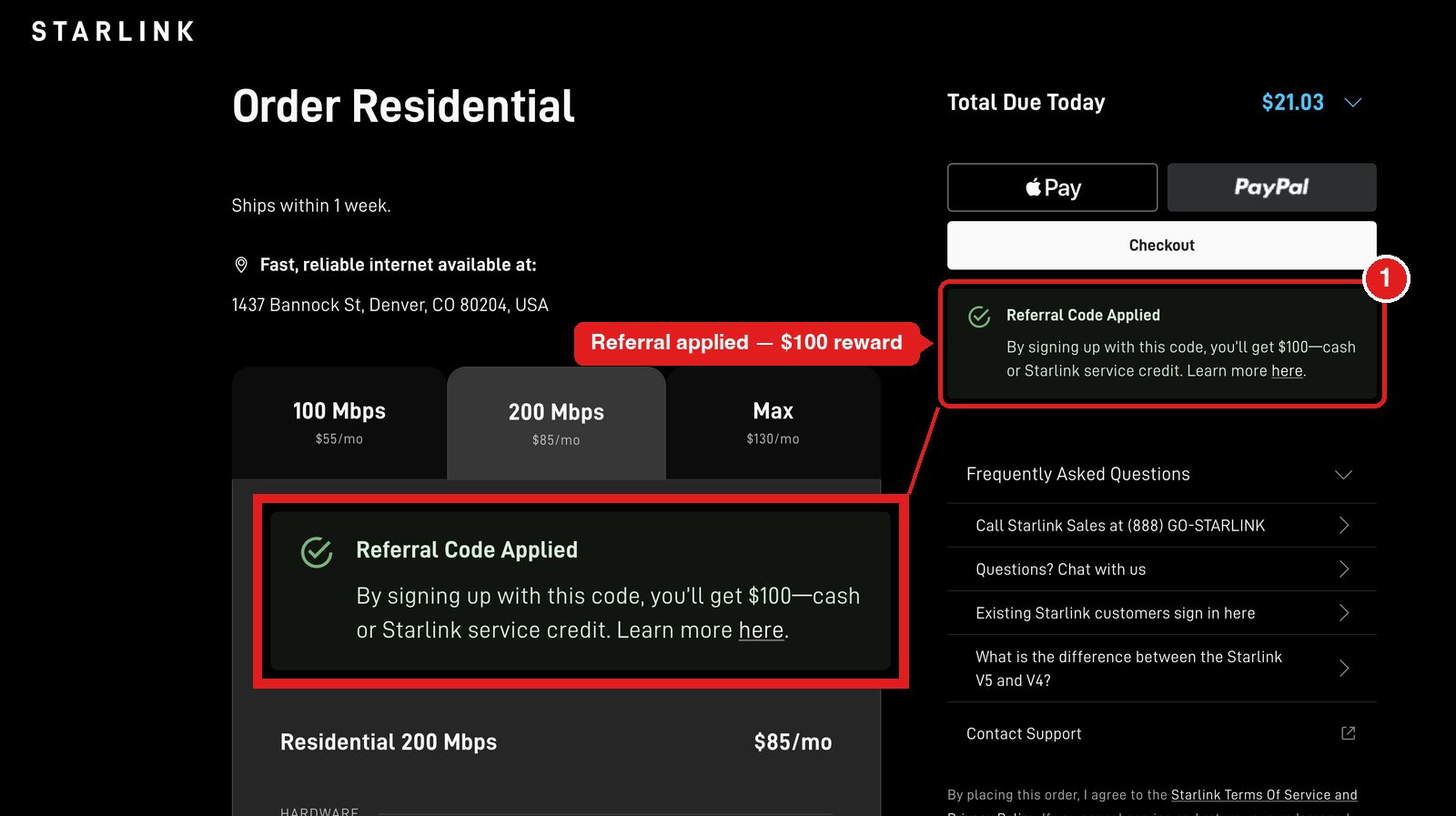
Starlink opened in a new tab. Look for this green box under Checkout:
Disclosure: this button opens starlink.com with the site owner’s own referral code in the link, so Starlink may give the owner a referral reward if you order. Your price is the same. US service addresses only. How we make money.
Checked against Starlink’s own pages US service addresses onlySources
Three checks in the starlink.com tab
The referral code went with you, tucked inside the web address. You won’t see a box to type it into, because there isn’t one. Starlink confirms the code later, on the order page.
- The address ends in
referral=RC-… - Type your service address, pick a plan, go on to the order page
- Under Checkout: green box, “Referral Code Applied”
What “applied” looks like
This is the only place in the order flow where Starlink names the code. We re-typed the wording here so it’s easy to read on a phone; the screenshot above is the real thing.
Referral Code Applied
By signing up with this code, you’ll get $100—cash or Starlink service credit. Learn more here.
Sample code (X’s, not a working code) next to Starlink’s wording, as we read it on . Starlink can change the wording.
How we took the screenshot
We opened our own link, typed a public Denver address (the City and County Building, 1437 Bannock St, Denver, CO 80202) and chose Residential 200 Mbps. Starlink now sets that plan’s price by address: $68–$85/mo in its own price data since late October 2026. Then we screenshotted the order page shown at the top of this page.
From the first page to the green box
Everything happens in the starlink.com tab. Stay in it from start to finish.
Land on starlink.com
The first page doesn’t say much about referrals. Tap the address bar: the web address should end in
referral=RC-followed by the code. That’s the code, travelling with you.Enter the service address, choose a plan
Use the US address where the dish will go. Starlink then shows the plans and prices for that address; for a home, that’s one of the Residential speeds.
Reach the order page
This is the page with your order summary, the total due today and the Checkout button. Don’t press Checkout yet.
Look directly under Checkout
A green box should read “Referral Code Applied”, followed by: “By signing up with this code, you’ll get $100—cash or Starlink service credit. Learn more here.” If it’s there, the code is attached. Finish your order as normal.
Green box missing? Why the code didn’t ride along
Fix it before you press Checkout. A referral can't be added after the order is placed.
- You went back to starlink.com by typing it, or from a search result
- A typed or searched address has no code in it. Use the referral link again.
- You switched phone, laptop or app partway
- Only the browser that opened the link has the code. Open the link on the device you’ll pay on, and finish in that browser rather than the Starlink app.
- A private window, strict tracking protection or cookie blocking
- These can lose the referral between pages. Try a normal window, or allow cookies for starlink.com, then reopen the link.
- You (or your household account) had Starlink before
- You are not, and have never been, a Starlink subscriber. Returning customers won’t see the box, and no link fixes that.
- You’re buying the kit in a store
- The kit and plan must be bought directly on starlink.com; stores, unauthorized resellers and private transfers don't count. The code lives only in the online order.
- You copied just the RC- code
- A bare code has nowhere to go: there’s no field for it. You need the whole link. Code vs link.
The reward, without the fine print
- What: a $100 reward (account credit, or cash where your account offers it) after two months subscribed.
- When: you pay your first bill as normal; the reward comes after two full monthly billing cycles and is applied to your second monthly invoice, as soon as about 60 days after activation. Keep service for you stay subscribed, in good standing, for two full monthly billing cycles.
- Credit or cash: the reward defaults to account credit; where your account offers it, you can switch it to cash paid to your bank account.
- Plans: Residential Lite, Residential, Residential 100 Mbps, Residential 200 Mbps, Residential Max, Roam 100GB, Roam 300GB and Roam Unlimited.
- Who: new customers only, ordering on starlink.com through the link, for a US service address.
Starlink sets the amount and can change the program. Every rule above links to Starlink’s terms or a named report in the sources. How this site is paid, and what that does and doesn’t change for you: how we make money.
Quick questions
Starlink’s home page says nothing about my code. Did it fail?
Not necessarily. When we tested the link on Oct 9, 2026, the code wasn’t confirmed on the first page at all. It showed up later, on the order page, in the green box under Checkout. Judge it there, not on the home page.
The green box isn’t there. Can I type the code in somewhere?
No. Starlink’s checkout has no field for a referral or promo code; the code only gets in through the link. Close the order tab, reopen the referral link in the same browser, and start the order again. Why there’s no box.
I closed the starlink.com tab by accident. Do I start over?
Yes, but it only takes a second: open the referral link again (the button at the top of this page does that if you came from here), then enter your address and pick a plan. Don’t go back to starlink.com by typing the address; that drops the code.
When does the $100 actually show up?
Not at checkout. You pay the kit and your first bill as normal. You pay your first bill as normal; the reward comes after two full monthly billing cycles and is applied to your second monthly invoice, as soon as about 60 days after activation. It lands as account credit unless you switch it to cash where your account offers that.
If the green box looks or reads differently from our screenshot, tell us and we’ll re-check and date the change.
Sources and the date we read them
- starlink.com en-US site text (the interface wording the home page loads) · Starlink’s own text, read
- How to Use Starlink's Referral Program (DISHYtech) · third-party report, read
- Referral Program Terms, US (starlink.com legal document DOC-1882-84808-83, version published Oct 7, 2026) · Starlink’s own text, read
- Does Starlink have a referral program? (Starlink help center) · Starlink’s own text, read
- Starlink US referrals page (starlink.com/us/referrals) · Starlink’s own text, read
- US Residential plan prices (the data starlink.com loads with no address entered; prices now vary by address) · Starlink’s own text, read
Show the exact wording behind each claim (13)
- Our reading
Our reading, not a Starlink sentence: on Nov 16, 2026 starlink.com’s order-page code had no “enter a referral code” wording and no input labelled referral.
- Third-party report
A banner at the top states that they are using your referral link. … double check that they see the 'Referral Code Applied' on the order page before submitting the order.
- Starlink’s own text
The Referred Subscriber places an order for a Starlink Kit using the Unique Referral Link provided by the Referrer. No other referral mechanism shall qualify as an Eligible Referral.
- Starlink’s own text
If they ordered without your link, used someone else's link, or bought from a retailer or marketplace store, the referral won't appear and can't be added later.
- Starlink’s own text
You and the person you refer receive the same amount after they have subscribed for two months … (for example, $100 in the US).
- Starlink’s own text
You and the person you refer receive the same amount after they have subscribed for two months … (for example, $100 in the US).
- Starlink’s own text
The Referred Subscriber must maintain continuously subscribed and in good standing for two full monthly billing cycles … applied on their second monthly subscription invoice.
- Starlink’s own text
you each will receive cash direct to your bank account or service credit
- Starlink’s own text
The Referred Subscriber is not, and has never been, a Starlink subscriber.
- Starlink’s own text
The Referred Subscriber must purchase a Starlink Kit and subscription directly from www.starlink.com. Signing up through any other channel is not eligible for a Reward, including, but not limited to, retail stores, unauthorized resellers, or a private transfer from a third party.
- Starlink’s own text
The Referred Subscriber must maintain continuously subscribed and in good standing for two full monthly billing cycles in order for a Pending Referral to mature to an Eligible Referral.
- Starlink’s own text
Residential Lite, Residential, Residential 100 Mbps, Residential 200 Mbps, Residential Max, Roam 100GB, Roam 300GB, Roam Unlimited (plans listed as earning referral rewards; Priority, Business and Enterprise accounts don't).
- Starlink’s own text
Residential 200 Mbps: $68, $76.50 or $85 a month in Starlink’s US price data since Oct 29, 2026, set by address ($76.50 on the no-address list on Nov 16, 2026).
Something out of date? Report it. We re-read these pages at least every 30 days.